Some texts were warm, some were stiff, some were too long, some sounded like they came from a grant application that had not seen daylight in three weeks. I am perfectly happy to admit that copywriting is not my strongest skill. So even when I had the content right, the text often still needed work. Our communications colleague then had to spend time editing not just for grammar, but for tone, clarity, vocabulary, and suitability for our audience.
In other words: the writing itself was not the main bottleneck. The editing loop was.
Then came our first really useful Custom GPT.
Our communications colleague built a GPT, loaded it with instructions about our audience, tone of voice, preferred vocabulary, and banned words, and shared it with the team. Since then, when we need a short text, we use our internal “Digivia copywriter” GPT. We still provide the substance, the facts, the point we want to make. But the GPT helps us turn that into text that already sounds like us. Most of the time, it needs little to no editing before publication.
The result was simple. I spend less time wrestling with wording and more time on the actual content. My colleague spends far less time cleaning up everyone else’s texts. Across the organization, our communication sounds more consistent, more intentional, and more suitable for the people we want to reach.
That is the moment when ChatGPT stops being a clever chat tool and starts becoming a work infrastructure.
And that shift, in my experience, often happens through two features: Custom GPTs and Projects. The core difference is this:
A Custom GPT helps you or your team repeat the same type of work well. A Project helps you or your team move one complex piece of work forward over time.
[Update from September 10th 2026: As of August 16th 2026, the option to create CustomGPTs is available for business accounts only (such as Business, Enterprise, and Edu workspaces). As per the official ChatGPT website, "New GPT creation and publishing are not available on personal ChatGPT accounts, including Free, Go, Plus, and Pro". Unless you've created a CustomGPT before the change, you can't access it through a free account. Please refer to this source.]
What is a Custom GPT?
A Custom GPT is a reusable assistant configured for a certain role, topic, or workflow. Instead of explaining yourself from scratch every time, you define the setup once: instructions, tone, boundaries, reference documents, maybe even connected capabilities. OpenAI describes GPTs in exactly these terms: custom versions of ChatGPT tailored for specific tasks or topics using instructions, knowledge files, and capabilities such as web search, image generation, or data analysis.
In simpler words, a Custom GPT is what you build when you are tired of repeating the same briefing over and over again.
Many people try to solve that by keeping one long chat thread alive and returning to it repeatedly. It can work, but long chats can drift: useful instructions get buried, and earlier turns can shape later answers in ways you no longer want. A Custom GPT gives you a cleaner starting point each time: the same instructions, without the baggage of a long drifting thread.
You can think of it as a specialist you onboard once and then call back whenever needed. That does not mean it becomes magically brilliant. It means it becomes more consistent. And for many organizations, consistency is half the battle.
And What About Projects?
A Project is a persistent workspace for one ongoing piece of work. Chats, files, and project instructions stay together in one place. OpenAI describes Projects as spaces that keep context together for repeated and evolving work, and notes that Business, Enterprise, and Edu users can also share Projects with teammates.
A Project is what you build when one important output needs several rounds of thinking, drafting, reviewing, and file-based context.
We recently used a Project while preparing a fundraising campaign in our organization. We uploaded our strategic and branding documents and used the Project as a shared workspace. One chat focused on researching potential target groups and their attitudes to technology and the nonprofit sector. Another turned that research into personas. Other chats helped us brainstorm campaign messaging, draft emails for potential donors, and shape the landing page. Different people worked on different chats, but all of them built on the same context and contributed to the same campaign. That is where Projects become especially useful: not when you need one good answer, but when several strands of work need to move one important output forward.
Custom GPTs or Projects?
The two tools are useful in very different situations, and using the wrong one creates unnecessary mess. This table can help you decide which is suitable for your case:
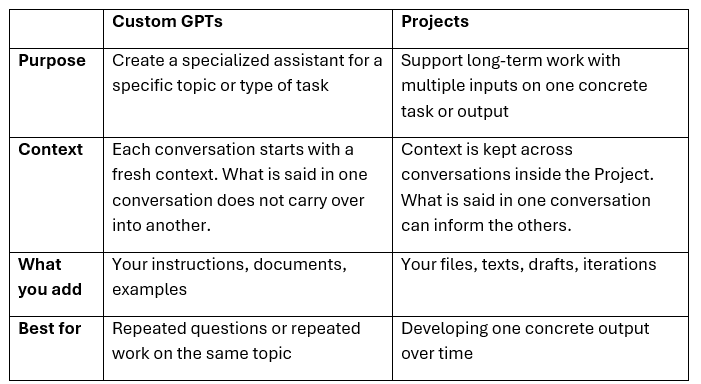 Both Custom GPTs and Projects are advanced features available only in paid ChatGPT plans. The free version supports basic chat only, though as a free user you can use Custom GPTs created by other people if they are made available to you.
Why This Matters for Teams, Not Only Individuals
OpenAI’s workspace features allow GPTs to be shared among team members in the workspace, with edit access for approved users, who can update and manage them without depending on the owner. Projects can also be shared in Business, Enterprise, and Edu plans, making it easier for teammates to align and work from the same context.
That matters because many organizations have a very familiar pattern: one person becomes “the AI person,” builds useful things, and everyone else depends on that person to keep them alive. It is not a strategy. It is a bottleneck with good branding.
Shared Custom GPTs reduce that dependency. Shared Projects reduce duplication, repeated briefing, and fragmented context. Together, they help turn personal experimentation into something closer to organizational capacity.
This is especially relevant for NGOs and small teams. Staff capacity is limited. Roles overlap. Institutional memory is fragile. If useful know-how can be turned into a shared GPT, or if a complex piece of work can live inside a shared Project instead of in fifteen separate chats and four people’s heads, that is not just faster. It is more resilient.
There is also one uncomfortable truth worth saying out loud: these tools will not fix a broken process. A Custom GPT will not solve unclear messaging. A Project will not solve a messy strategy. AI amplifies the process you already have. If the team has no shared understanding of audience, goals, or standards, the machine will only help you produce confusion more efficiently.
Other Strong Uses for Custom GPTs
The copywriting example is an easy one to relate to, but it is far from the only useful setup.
A project evaluator can review grant drafts, concept notes, or program plans against clear criteria, your mission and strategy, as well as point out weak logic, vague outcomes, or missing risks. It comes in very handy when everyone focuses on the activity list, and nobody wants to ask what the actual change is supposed to be.
A persona to chat with is one of the most underrated options. You can create a GPT that responds like a skeptical donor, an overworked board member, a cautious colleague, or a confused participant. Sometimes the best thing AI can give you is not an answer, but a rehearsal partner.
Strong Uses of Projects
Projects shine when one important output needs many moving parts to come together as in my fundraising example.
The same goes for strategic planning. Goals, workshop notes, stakeholder input, assumptions, risks, versions, comments from leadership, comments from staff, maybe one comment from somebody who has only now discovered the process and wants to rewrite page one. A Project keeps that work in one place.
Other suitable scenarios can be grant proposal development or choosing and setting up a new tool in an organization like the CRM system.
Three Practical Rules Before You Start
1. Start with one real pain point, not with enthusiasm alone. Build where the friction already is.
2. Choose the tool based on the workflow. Repeated role or repeated type of task: Custom GPT. One evolving outcome with many materials: Project.
3. Assign ownership. Decide who updates instructions, who reviews output quality, and what information should never be uploaded. Good AI use is not just about prompting. It is also about governance.
And not every task needs a Custom GPT or a Project. Sometimes a simple chat is exactly the right tool—quick questions, quick rewrites, quick clarity. The point is to match the setup to the work, not to build infrastructure for its own sake.
But when you want efficiency at scale, with less repeated briefing, more consistent output, and smoother collaboration, that is where Custom GPTs and Projects start to pay off. Basic chat helps you finish a task. GPTs and Projects help your team get better at the task.
Your Feedback Matters
What did you think of this text? Take 30 seconds to share your feedback and help us create meaningful content for civil society!

This article was last updated on September 10th 2026, to reflect the recent developments. As of August 16th 2026, the option to create CustomGPTs is available for business accounts only (such as Business, Enterprise, and Edu workspaces). As per the official ChatGPT website, "New GPT creation and publishing are not available on personal ChatGPT accounts, including Free, Go, Plus, and Pro". Unless you've created a CustomGPT before the change, you can't access it through a free account. Please refer to this source.
Disclaimers
This piece of resource has been created as part of the AI for Social Change project within TechSoup's Digital Activism Program, with support from Google.org.
AI tools are evolving rapidly, and while we do our best to ensure the validity of the content we provide, sometimes some elements may no longer be up to date. If you notice that a piece of information is outdated, please let us know at content@techsoup.org.
The content was created, reviewed, and edited by Radka Bystricka with AI assistance.